Draws text on every frame indicating what frame number AviSynth sees at that
point in the script. This is sometimes useful when writing scripts. If you
apply additional filters to the clip, they will treat the text on the frame
just as they would treat an image, so the numbers may be distorted by the
time you see them. Sometimes this is what you want, as it shows frame blending etc.
The frame numbers will be drawn on the left side of the clip for frame-based,
top field first material; on the right side for frame-based, bottom field first
material and alternating on the left side and right for field-based material,
depending whether the field is top or bottom. Much more on the topic of
interlaced video on this page: Interlaced Fieldbased.
Due to antialiased text rendering, this filter can be a little slow.
If true, the frame number will be drawn only once on the video and
scroll from top to bottom;
If false, it will be drawn on one side, stacked vertically as often
as it fits.
Default: false
offset
Sets the starting frame number.
Default: 0
x,y
Text position. Their interpretation corresponds to Subtitle'salign=4 and the special meaning of -1 is not available. Note that x
and y must be used together or not at all; if they are present, the
scroll option is ignored.
Default: 0.0, 0.0
font
Font name; can be the name of any installed Windows font when gdi=true.
When gdi=false, only internal bitmap fonts are available ("Terminus"
or "info_h").
Default: "Arial" when gdi=true, "Terminus" when gdi=false
size
Height of the text in pixels.
Default 24.
text_color,halo_color
Colors for font fill and outline respectively. Default is yellow and black.
See Subtitle and the colors
page for more information on specifying colors.
Default: $00FFFFFF, $00000000
font_width
Set character width in logical units, to the nearest 0.125 unit.
See the example section of Subtitle for an example.
Default: 0 (use Windows' default width)
font_angle
Adjust the baseline angle of text in degrees anti-clockwise to the
nearest 0.1 degree.
Default: 0.0 (no rotation)
bold
Using bold letters or not
Default: true when gdi=true, false when gdi=false
italic
Using italic letters or not
Default: false
noaa
Disables antialiasing when drawing the text
Default: false
gdi
When true, text is rendered using the Windows GDI Antialiaser, which
produces antialiased output but is slower.
When false, the built-in bitmap font (Terminus) is used. This is faster
and is the only option on non-Windows platforms.
Ignored (forced to false) on non-Windows builds.
Default: true on Windows (with GDI support), false otherwise
Displays SMPTE-style timecode labels for the current frame. Format is
HH:MM:SS:FF (for example "03:52:39:24" = 3 hours, 52 minutes, 39 seconds and
24 frames).
Frame 0 is marked "00:00:00:00", frame 1 is marked "00:00:00:01" and so on –
unless an offset is applied.
Due to antialiased text rendering, this filter can be a little slow.
With certain exceptions, SMPTE timecode has no concept of fractional frame
rates (like 24.5 fps for example).
ShowSMPTE source clips must have an integer framerate (18, 24, 25, 30,
31,...) or a drop-frame rate ('29.97' being the most common). Supported
drop-frame rates are listed in the table below. If
that's not the case an error will be thrown.
If the framerate is not integral or drop-frame (let's call it "nonstandard"
for short), use ShowFrameNumber or ShowTime instead.
You may encounter media sources that are almost at a standard framerate,
but not quite – perhaps due to an error in processing at some point, or
perhaps the source was something like a security camera or a video game
console. In this case you should force the clip to the nearest standard
framerate with AssumeFPS.
When television began, it was black-and-white only. At that time NTSC
("American" standard) television ran at 30 frames per second (60 fields per
second). When the television engineers added color, they slowed the frame rate
by the precise ratio 1000/1001, due to technical reasons. NTSC televisions
now run at 30×1000/1001 or approximately 29.97002997 frames per second. This is
commonly called "29.97 fps." 29.97 is the nominal framerate, a convenient
shortcut term for 30×1000/1001.
This slight slowing of the framerate complicates the display of timecode.
A second of time no longer consists of a whole number of frames. If the
timecode readout simply advanced the seconds counter every 30 frames, the
timecode reading would be slower than clock time by about 3.6 seconds per hour.
Timecode displays cannot show "fractional" frames (their whole purpose is to
uniquely identify every frame) so they drop the display of just enough frame
numbers to make the displayed timecode correspond to real or clock time. This
is done in a prescribed and repeatable fashion: the first two frame numbers of
every minute, except for the tenth minute, are dropped, ie:
ShowSMPTE automatically assumes drop-frame timecode given certain input
framerate ranges, as listed in the table below. For example, if the input
framerate is > 29.969 and < 29.971 fps, the framerate is assumed to be
30×1000/1001 for time calculation, and drop-frame counting is used.
Input fps (bounds excluded)
Assumed rate
Nominal rate
23.975 – 23.977
24×1000/1001
23.98
29.969 – 29.971
30×1000/1001
29.97
47.951 – 47.953
48×1000/1001
47.95
59.939 – 59.941
60×1000/1001
59.94
119.879 - 119.881
120×1000/1001
119.88
You may encounter the term "NDF" - this means "non-drop-frame." As you would
expect, this is used for all the integer framerates. Sometimes though, video
running at drop-frame rates will have NDF timecode. This is most common for
short-form videos of a few minutes' duration at most: some video professionals
prefer not to skip frame numbers at all, even though the time display will be
off slightly. To get ShowSMPTE to show NDF timecode at drop-frame rates, see
the examples section below.
A debug filter that computes the CRC32 checksum of selected planes of each frame and overlays
the result as an uppercase hexadecimal string.
By default (no channels or mode given) the result is a single 8-character value
(e.g. "AB12CD34"). With the channels and mode parameters the filter can cover
any combination of planes and either combine them into one CRC or show them side by side.
For packed formats (YUY2, RGB24/32/48/64) with default parameters the interleaved
buffer is hashed directly, matching the original pre-3.7.6 behaviour. When channels
or mode is specified the clip is internally converted to a planar equivalent first.
For planar RGB(A) clips planes are always processed in R, G, B, A logical order,
regardless of the physical plane storage order.
The text placement and scrolling behaviour are identical to ShowFrameNumber.
If true, the checksum will be drawn only once on the video and
scroll from top to bottom;
If false, it will be drawn on one side, stacked vertically as often
as it fits.
Default: false
offset
Frame number offset added to the internal counter. A positive value makes the
display start from a later logical frame; a negative value from an earlier one.
Default: 0
x,y
Text position. Their interpretation corresponds to Subtitle'salign=4. x and y must be used together or not at all; when present,
the scroll option is ignored.
Default: 0.0, 0.0
font
Font name; can be the name of any installed Windows font when gdi=true.
When gdi=false, only internal bitmap fonts are available ("Terminus"
or "info_h").
Default: "Arial" when gdi=true, "Terminus" when gdi=false
size
Height of the text in pixels.
Default: 24
text_color,halo_color
Colors for font fill and outline respectively. Default is yellow and black.
See Subtitle and the colors
page for more information on specifying colors.
Default: $00FFFF00, $00000000
font_width
Set character width in logical units, to the nearest 0.125 unit.
See the example section of Subtitle for an example.
Default: 0 (use Windows' default width)
font_angle
Adjust the baseline angle of text in degrees anti-clockwise to the
nearest 0.1 degree.
Default: 0.0 (no rotation)
bold
Using bold letters or not.
Default: true when gdi=true, false when gdi=false
italic
Using italic letters or not.
Default: false
noaa
Disables antialiasing when drawing the text.
Default: false
channels
Selects which planes to include in the checksum, using their initial letters.
For YUV(A) clips: Y, U, V, A. For RGB(A) clips: R, G, B, A.
Letters are not case-sensitive and may appear in any order; unrecognised
letters are silently ignored.
For planar RGB(A) planes are always processed in R, G, B, A order regardless
of the order given here.
Default: all planes of the current color space (same set as Invert).
mode
Controls how checksums from multiple planes are combined.
0 — compute a single CRC32 over all selected planes concatenated in order;
the result is one 8-character hex value (e.g. "AB12CD34").
1 — compute a separate CRC32 per selected plane; the result shows each
plane label followed by its value (e.g. "Y:AB12CD34U:12345678V:ABCDEF01").
Default: 0
showmode
Controls whether the CRC result is overlaid as text, stored as a frame property,
or both.
0 — display only (default; original behaviour).
1 — display the text and store the CRC value(s) as an integer array frame
property named ShowCRC32. For mode=0 the array has one element; for
mode=1 it has one element per active plane, in display order.
2 — store the frame property only; no text is drawn on the output.
Values are unsigned 32-bit integers stored as int64 (the native array element
type for AviSynth frame properties).
Default: 0
gdi
When true, text is rendered using the Windows GDI Antialiaser, which
produces antialiased output but is slower.
When false, the built-in bitmap font (Terminus) is used. This is faster
and is the only option on non-Windows platforms.
Ignored (forced to false) on non-Windows builds.
Default: true on Windows (with GDI support), false otherwise
Draw the frame numbers in red, scrolling from top to bottom, starting with
"00009":
# this is always top field first, therefore numbers will be on the left
Mpeg2Source("clip.d2v")
ShowFrameNumber(scroll=true, offset=9, text_color=$ff0000)
Showing non-drop-frame timecode at drop-frame rates:
ColorBars()## (framerate = 29.97)ShowSMPTE(size=24,y=24)## timecode (top of screen) is DF (drop-frame)C=LastAssumeFPS(30)## force integer framerateShowSMPTE()## timecode (bottom of screen) is NDFAssumeFPS(C)## fps returned to originalreturnLast## DF (top) skips frame numbers at frames 1800, 3598, 106094...## NDF (bottom) does not skip numbers but runs slower than real time## (frame 106094 = DF "00:59:00:02" == NDF "00:58:56:14")
Using offset, x, y, font, size, and text_color
arguments:
Default behaviour on a packed RGB32 clip — the whole interleaved frame buffer is
hashed and a single 8-character hex value is overlaid:
ColorBars(pixel_type="RGB32").ShowCRC32()
Equivalent explicit call — mode=0 combines all RGBA planes into one CRC.
For packed RGB32 with explicit parameters the clip is first converted to planar
RGBA internally, so all four planes are covered:
Store CRC values as a frame property without drawing anything on screen, then
display the property with propShow. channels="RGBA" is specified, but
RGBP8 has no alpha plane — the A letter is silently ignored, so the
property array will have three elements (R, G, B) rather than four. No error
is raised:
 LSMASHSource("sintel-2048-surround.mp4") ShowFrameNumber()
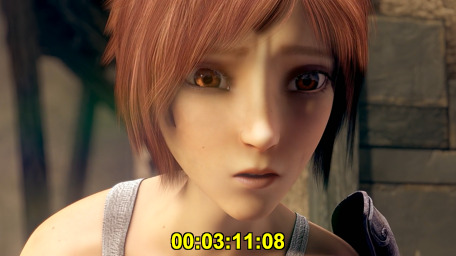 LSMASHSource("sintel-2048-surround.mp4") ShowSMPTE()
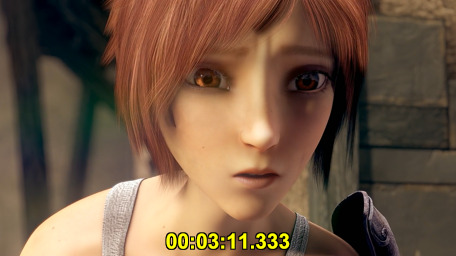 LSMASHSource("sintel-2048-surround.mp4") ShowTime()
LSMASHSource("sintel-2048-surround.mp4")
ShowTime()