Subtitle / Text
Set of filters to overlay text on a clip:
Subtitle adds anti-aliased text to a range of frames. It includes features like alpha blending, font spacing, rotation, etc. Only available on Windows.
Text is a stripped-down version of the Subtitle filter. It only works with bitmap fonts and the set of features are limited. Available on Windows and other non-Windows OSes.
Subtitle
The Subtitle filter adds anti-aliased text to a range of frames. All
parameters after text are optional and can be omitted or specified out of order
using the name=value syntax.
The short form (with all default parameters) is useful when you don't really care what the subtitle looks like as long as you can see it—for example, when you're using StackVertical and its ilk to display several versions of a frame at once, and you want to label them to remember which is which.
Syntax and Parameters
Subtitle (clip, string text, float "x", float "y", int "first_frame",
          int "last_frame", string "font", float "size", int "text_color",
          int "halo_color", int "align", int "spc", int "lsp", float "font_width",
          float "font_angle", bool "interlaced", string "font_filename", bool "utf8",
          bool "bold", bool "italic", bool "noaa", string "placement", bool "gdi")
- clip
Source clip; all color formats supported.
- text
The text to be displayed.
- x, y
Text position. Can be set to -1 to automatically center the text horizontally or vertically, respectively. Negative values of
xandynot equal to -1 can be used to move subtitles partially off the screen.Default values:
x= 8 if align=1,4,7 or none; -1 if align=2,5,8; or width-8 if align=3,6,9y= size if align=4,5,6 or none; 0 if align=7,8,9; or height-1 if align=1,2,3
- first_frame, last_frame
The text will be shown starting from frame
first_frameand ending with framelast_frame.Default: 0, (inputclip.Framecount-1)
- font
Font name; can be the name of any installed Windows font.
Default: "arial"
- size
Height of the text in pixels, and is rounded to the nearest 0.125 pixel.
Default: 18
- text_color, halo_color
Colors for font fill and outline respectively.
These may be any of the preset colors, or specified as hexadecimal $AARRGGBB values, similar to HTML--except that they start with $ instead of # and the 4th octet specifies the alpha transparency. $00rrggbb is completely opaque, $FFrrggbb is fully transparent. You can disable the halo by using FF as the alpha value.
See Colors for more information on specifying colors.
For YUV clips, the colors are converted from full range to limited range Rec.601.
Default: $00FFFF00, $00000000
- align
Set where the text is placed, based on the numeric keypad layout, as follows:
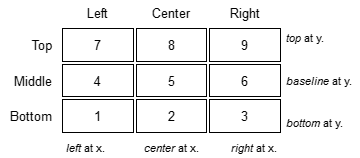
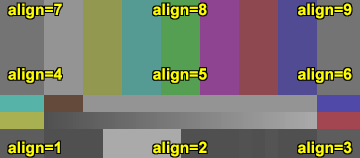
Default: 7, or top-left. If
xand/oryare given, text is positioned relative to the (x,y) location. Note there is no Y-center alignment setting.
- spc
Modify the inter-character spacing. If
spcis less than zero, inter-character spacing is decreased; if greater, the spacing is increased. Default is 0: use Windows' default spacing.This is helpful for trying to match typical fonts on the PC to fonts used in film and television credits which are usually wider for the same height or to just fit or fill in a space with a fixed per-character adjustment. See example below.
For more information, see the Microsoft documentation of the function SetTextCharacterExtra().
Default: 0
- lsp
Line Spacing Parameter; enables multi-line text (where "\n" enters a line break). If
lspis less than zero, inter-line spacing is decreased; if greater, the spacing is increased, relative to Windows' default spacing. By default, multi-line text disabled.In the unlikely event that you want to output the characters "\n" literally in a multi-line text, you can do this by using "\\n".
Since 3.7.4 SubTitle accept real LF (
\r) or CR LF (\r\n) control characters for line break, without the need of specifyinglspparameter.String functions which return an LF separated list such as ListAutoloadDirs can be Subtitle'd directly.
- font_width
Set character width in logical units, to the nearest 0.125 unit. Default=0, use Windows' default width. See example below.
Character width varies, depending on the font face and size, but "Arial" at
size=16is about 7 units wide; iffont_widthis less than that, (but greater than zero), the text is squeezed, and if it is greater, the text is stretched. Negative numbers are converted to their absolute values.For more information, see the Microsoft documentation of the function CreateFont().
Default: 0.0
- font_angle
Adjust the baseline angle of text in degrees anti-clockwise to the nearest 0.1 degree. Default 0, no rotation.
Default: 0.0
- interlaced
When enabled, reduces flicker from sharp fine vertical transitions on interlaced displays. It applies a mild vertical blur by increasing the anti-aliasing window to include 0.5 of the pixel weight from the lines above and below.
Default: false
- font_filename
Allows using non-installed font, by giving the font file name. Once it is loaded, other Subtitle instances can use it.
Default: ""
- utf8
Allows drawing text encoded in UTF-8. Can be a bit tricky, since AviSynth does not support utf8 scripts. But when a unicode script containing non-ansi characters is saved as UTF8 without BOM, the text itself can be passed as-is and providing the
utf8=truesetting.Default: false
- bold
- Using bold letters or notDefault is true, since bold has better visibility.
Default: true
- italic
- Using italic letters or not
Default: false
- noaa
- Disables antialiasing when drawing the text.Setting it true will disable antialiasing. Useful when someone would use
"VCR OSD Mono"as-is, without beautifying the outlines, as it as mentioned in https://forum.doom9.org/showthread.php?t=184627Default: false
- placement
Chroma location hint. Used in subsampled YUV formats, otherwise ignored. Valid values are the same as in
ChromaInPlacementandChromaOutPlacementin the Convert functions.Implemented values (when
gdi=true, the default):"MPEG2"(synonyms:"left") — default. Chroma samples on the left column."MPEG1"(synonyms:"jpeg","center") — chroma samples centered."top_left"— UHD 4:2:0; chroma samples on the top-left pixel of the group.
When
gdi=false, only"left"and"center"are implemented (same asText).Default value is
read from
"_ChromaLocation"frame property, otherwise"left"override or set from
"placement"parameter if parameter is other than"auto"if
"auto"+ have frame property → use frame propertyif
"auto"+ no frame property → use"left"no frame property and no parameter → use
"left"
- gdi
- When true, text is rendered using the Windows GDI Antialiaser, which produces antialiased output and supports TrueType fonts,
font_filename,font_width,font_angle,interlaced,noaa, and fullplacementsupport including"top_left".When false, the built-in bitmap font (Terminus) is used — same rendering as theTextfilter. Faster and cross-platform compatible but limited:font_filename,font_width,font_angle,interlaced,noaaandfont(font name) are ignored; only"left"and"center"placement are implemented.Default: true
Text
The Text filter is a stripped-down version of the Subtitle filter that works with bitmap fonts. It includes 2 fonts or can load an external BDF font file.
Text treats real LF (\n) control characters for line break, without the need
of specifying lsp parameter.
Syntax and Parameters
Text (clip, string text, float "x", float "y", int "first_frame",
      int "last_frame", string "font", float "size", int "text_color",
      int "halo_color", int "align", int "spc", int "lsp", float "font_width",
      float "font_angle", bool "interlaced", string "font_filename", bool "utf8",
      bool "bold", bool "italic", bool "noaa", string "placement", bool "gdi")
- clip
Source clip; all color formats supported.
- text
The text to be displayed.
- x, y, first_frame, last_frame
Same as Subtitle.
- font
- Font name; can be "Terminus" or "Info_h" or path to a BDF font file."Info_h" is fixed to 10x20 in size.
Default: "Terminus"
- size
Only applicable when
font="Terminus"; valid sizes are 12, 14, 16, 18, 20, 22, 24, 28, 32.Default: 18
- text_color, halo_color
Colors for font fill and outline respectively. Works the same as Subtitle, except for the transparency values. There is no transparency for
text_colorand forhalo_coloronly the following options are available.MSB byte of
halo_color:FF : semi-transparent box around text without halo.
FE : semi-transparent box around text and use ordinary color bytes of
halo_color.00 : use
halo_color.01 - FD : no halo.
Default: $00FFFF00, $00000000
- align, spc, lsp
Same as Subtitle;
spcnot available.
- font_width, font_angle, interlaced
Not available.
- font_filename
Same as Subtitle except it only accepts BDF fonts.
Default: ""
- utf8
Same as Subtitle. Much more international unicode characters (1354), use
utf8=trueunder Windows.Default: false
- bold
Only applicable when
font="Terminus"; set to true for bold text.Default: false
- italic, noaa
These parameters have no effect in Text. They are provided only to match the parameter list with SubTitle, because on non-Windows systems "Subtitle" is aliased to "Text", so each Subtitle parameter must exist in "Text" as well.
- placement
Chroma location hint. Used in subsampled YUV formats, otherwise ignored. Valid values are the same as in
ChromaInPlacementandChromaOutPlacementin the Convert functions.Implemented values (
TextandSubtitlewithgdi=false):"MPEG2"(synonyms:"left") — default. Chroma samples on the left column."MPEG1"(synonyms:"jpeg","center") — chroma samples centered.
Default value is
read from
"_ChromaLocation"frame property, otherwise"left"override or set from
"placement"parameter if parameter is other than"auto"if
"auto"+ have frame property → use frame propertyif
"auto"+ no frame property → use"left"no frame property and no parameter → use
"left"
- gdi
This parameter has no effect in
Text. It is provided only to match the parameter list withSubtitle, because on non-Windows systemsSubtitleis aliased toText, so eachSubtitleparameter must exist inTextas well.Default: false
Examples
Center text
AviSource("clip.avi")
Subtitle("Hello world!", align=5)
Some text in the upper right corner of the clip with specified font, size and color red
AviSource("clip.avi")
Subtitle("Hello world!", font="georgia", size=24, text_color=$ff0000, align=9)
Prints text on multiple lines without any text halo border.
BlankClip()
Subtitle( \
  "Some text on line 1\\nMore text on line 1\n" + \
  "Some text on line 2", \
         lsp=10, halo_color=$ff000000)
It results in:
Some text on line 1\nMore text on line 1
Some text on line 2
Prints text on multiple lines, direct control characters
BlankClip()
Subtitle( \
  e"Some text on line 1\n" + \
  "Some text on line 2", \
         , halo_color=$ff000000)
#note: using e-prefixed escape sequence aware string literal
Use String() to display values of functions.
AviSource("clip.avi")
Subtitle("Width=" + String(Width()))
Using spc and font_width arguments
ColorBars().KillAudio()
Subtitle("ROYGBIV", x=-1, y=100, spc=-10, font_width=6)
Subtitle("ROYGBIV", x=-1, y=150, spc=0,  font_width=0) ## width=default
Subtitle("ROYGBIV", x=-1, y=200, spc=10, font_width=10)
Subtitle("ROYGBIV", x=-1, y=250, spc=20, font_width=20)
Animated parameter demonstration
ColorbarsHD(width=640, height=360)
AmplifyDB(-30)
Tweak(cont=0.5, sat=0.5)
ConvertToRGB32(matrix="PC.709")
Trim(0, 255)
s1 = "THE QUICK BROWN FOX JUMPS OVER THE LAZY DOG."
s3 = "THE QUICK BROWN FOX \nJUMPS OVER \nTHE LAZY DOG."
minvalue = -32.0
maxvalue = +128.0
B = BlankClip(Last, length=15)
return Animate(Last, 0, 255, "anim_aln", s3, 1.000000, s3, 9.999999)
   \ + B
   \ + Animate(Last, 0, 255, "anim_spc", s1, minvalue, s1, maxvalue)
   \ + B
   \ + Animate(Last, 0, 255, "anim_wid", s1, minvalue, s1, maxvalue)
   \ + B
   \ + Animate(Last, 0, 255, "anim_lsp", s3, minvalue, s3, maxvalue)
   \ + B
   \ + Animate(Last, 0, 255, "anim_ang", s1, -15.0000, s1, 375.0000).FadeOut(15)
function anim_aln(clip C, string s, float f) {
    return C.Subtitle(s, align=Floor(f), lsp=0)
    \       .Subtitle("align = "+String(Floor(f)),
    \                 x=-1, y=C.Height-42, size=32, text_color=$c0c0c0)
}
function anim_spc(clip C, string s, float f) {
    return C.Subtitle(s, align=8, spc=0, text_color=$c0c0c0)
    \       .Subtitle(s, align=5, spc=Round(f))
    \       .Subtitle("spc = "+String(Round(f)),
    \                 align=2, size=32, text_color=$c0c0c0)
}
function anim_wid(clip C, string s, float f) {
    return C.Subtitle(s, align=8, font_width=0, text_color=$c0c0c0)
    \       .Subtitle(s, align=5, font_width=Round(f))
    \       .Subtitle("font_width = "+String(Round(f)),
    \                 align=2, size=32, text_color=$c0c0c0)
}
function anim_lsp(clip C, string s, float f) {
    return C.Subtitle(s, align=8, lsp=0, text_color=$c0c0c0)
    \       .Subtitle(s, align=5, lsp=Round(f))
    \       .Subtitle("lsp = "+String(Round(f)),
    \                 align=2, size=32, text_color=$c0c0c0)
}
function anim_ang(clip C, string s, float f) {
    return C.Subtitle(s, align=5, font_angle=f)
    \       .Subtitle("font_angle = "+String(f, "%03.3f"),
    \                 align=2, size=32, text_color=$c0c0c0)
}
UTF8 text indirectly
Title="Cherry blossom "+CHR($E6)+CHR($A1)+CHR($9C)+CHR($E3)+CHR($81)+CHR($AE)+CHR($E8)+CHR($8A)+CHR($B1)
Subtitle(Title, utf8=true)
Using the Text filter
Text("Terminus", size=20, align=4)
Text("Info_h", font="Info_h", align=5)
Text("Load bdf font", font="spleen-12x24.bdf", align=6)
Changelog
$Date: 2025/03/23 22:30:00 $
