RGBAdjust
Description
RGBAdjust has many different methods of changing the color and luminance of your RGB clips. Gain, bias (offset) and gamma can be set independently on each channel. Also included are an analysis function and a dither option.
All settings for this filter are optional. ColorYUV works in a similar manner for YUV clips.
All RGB and RGBA color formats are supported.
This filter multiplies each color channel with the given value, adds the given bias offset then adjusts the relevant gamma, clipping the result at 0 and 255 (8 bit case).
Syntax and Parameters
RGBAdjust (clip, float "r", float "g", float "b", float "a",
float "rb", float "gb", float "bb", float "ab",
float "rg", float "gg", float "bg", float "ag",
bool "analyze", bool "dither", bool "conditional", bool "condvarsuffix")
- float r, g, b (default 1.0):
Red, green and blue scaling factor. Range 0.0 to 255.0 For example, r=3.0 multiplies the red channel pixel values by 3. Avisynth+ autoscales – works without changes at all bit depths, gain is bit depth independent.
- float a (default 1.0):
Alpha adjustment - the transparency information on a per-pixel basis. An alpha value of zero represents full transparency, and a value of 1 represents a full opacity.
- float rb, gb, bb, ab (default 0.0):
Bias adjustment—add a fixed positive or negative value to a channel's pixel values. For example,
rb=16 will add 16 to all red pixel values and
rb=-32 will subtract 32 from all red pixel values.
This parameter is not bit depth autoscaled – caller must scale arguments by 4 for 10-bit, etc.
- float rg, gg, bg, ag (default 1.0):
Gamma adjustment—an exponential gain factor. For example,
rg=1.2 will brighten the red pixel values and
gg=0.8 will darken the green pixel values.
- bool analyze = false:
If true, RGBAdjust will print color channel statistics on the screen (see example below)
There are Maximum and Minimum values for all channels.
There is an Average and a Standard Deviation for all channels.
There is Loose Minimum and Loose Maximum which ignore the brightest and darkest 0.4% (1/256) pixels.
AVS+ parameter is supported for 32 bit float color spaces as well, but loose min/max is based on a 16-bit quantized data (loose min/max is based on an internal histogram).
- bool dither = false
When set to true, ordered dithering is applied when doing the adjustment. Parameter is ignored for 32 bit float color spaces
- bool conditional = false
If true, the global variables "rgbadjust_xxx" with xxx =
r,g,b,a,rb,gb,bb,ab,rg,gg,bg,ag
are read each frame, and applied.
It is possible to modify these variables using FrameEvaluate or ConditionalReader. (functionality similar to ColorYUV)
- string condvarsuffix = ""
This parameter works similarly in ColorYUV, RGBAdjust, Overlay, ConditionalReader. Allows multiple filter instances to use differently named conditional parameters, thus preventing collision and overwrite of variables which are used by different ConditionalReader instances. See Conditional Variables section.
In the matching ConditionalReader one have to use the modified name as well:
ConditionalReader("coloryuvoffset.txt", "coloryuv_gain_y", false, CondVarSuffix = "_a") # "_a" is added here by parameter
ConditionalReader("rgbfix.txt", "rgbadjust_r", false, CondVarSuffix = "_1") # "_1" is added here by parameter
ConditionalReader("rgbfix2.txt", "rgbadjust_r", false, CondVarSuffix = "_2") # "_2" is added here by parameter
or specify the suffixed name directly:
ConditionalReader("coloryuvoffset.txt", "coloryuv_gain_y_a", false) # "_a" is added here manually
Notes
All arguments default—leaves the clip untouched:
RGBAdjust (1, 1, 1, 1, 0, 0, 0, 0, 1, 1, 1, 1) leaves
Keep in mind ALL the values are not scaled to accomodate changes to one (for that you should use Levels) so doing something like:
RGBAdjust(2, 1, 1, 1)
will get you a whole lot of clipped red. If you WANT a whole lot of clipped red, there you go - but if you want MORE red without clipping you should do
Levels(0, 1, 255, 0, 128).RGBAdjust(2, 1, 1, 1)
This would scale all the levels (and average lum) by half, then double the red. Or more compact
RGBAdjust(1.0, 0.5, 0.5, 1.0)
This leaves the red and halves the green and blue.
To invert the alpha channel
RGBAdjust(a=-1.0, ab=255)
Thus alpha pixels values become a=(255-a)
Example
Demonstrating analyze output:
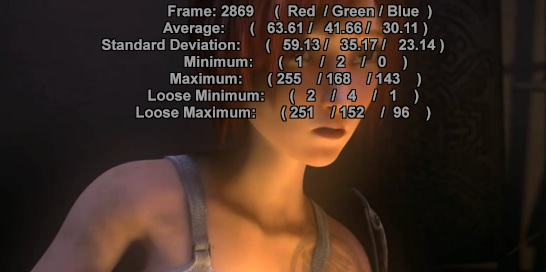
FFmpegSource2("sintel.mp4")
ConvertToRGB32
BicubicResize(546, 272)
RGBAdjust(analyze=true)
Changes
Changelog: |
|
|---|---|
3.7.1 |
analyze for 32bit float color spaces |
r2915 |
Added condvarsuffix |
r2724 |
Added 32 bit float.
Added conditional
|
v2.56 |
Added offsets, gamma, analyze. |
v2.60 |
Added dither. |
$Date: 2026-01-27 12:30:00 $
